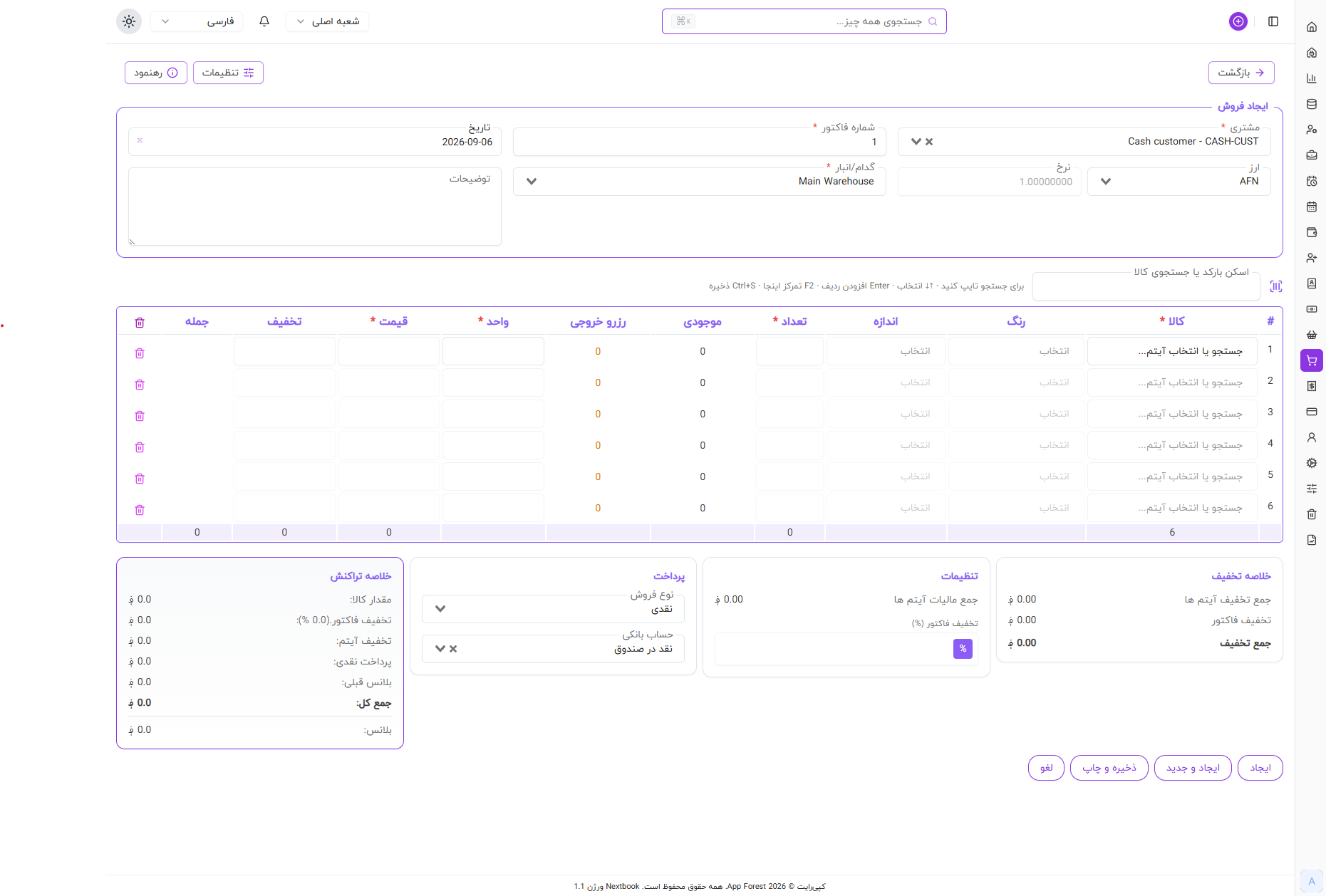
The system numbers it automatically. The numbering pattern is configurable in preferences.
Date
The sale date. Income and the stock reduction post on this date.
Customer
The sales party. Their balance increases after posting. If they have a prior balance, the form shows it.
Warehouse
The warehouse goods leave from. It must have enough stock (unless negative-stock sales are allowed in preferences).
Currency and rate
The invoice currency. If it differs from the company base currency, enter the exchange rate.
Payment terms
The customer’s payment window (cash, 7 days, 30 days). Used for the receivable aging report.
b) Item lines
Field
Description
Item
Pick from the list or scan the barcode.
Quantity and unit
The number sold. The unit must match the item’s registered unit.
Unit price
The sale price. It comes from the item default and can be changed if your role allows it.
Discount
As an amount or a percentage on that line.
Tax
If the item or customer has a tax rate, it is calculated automatically.
Batch / expiry
For batch-tracked items. The system suggests the oldest batch first (FIFO).
Some discounts fill themselves in If a discount rule covers the item, the line’s discount box is filled in for you and the rule’s name appears beneath it. Type over the figure to overrule it — the rules then leave that line alone. Clearing the box means no discount and is saved as such. Discount rules are set up under Inventory → Discount rules.
c) Invoice footer
Whole-invoice discount: on top of line discounts, you can discount the grand total.
Additional charges: such as freight billed to the customer.
Amount received: if you are taking money now, enter it here so a receipt is created automatically.
Notes: an internal note or text printed on the invoice.
The sales invoice form — header, item table, and footer totals